
Mandatory Dataset
The following core dataset files are mandatory for building the Yieldigo instance and must be provided in the structure described below.
mandatory_dataset.zip
Categories
To enable accurate product categorization, a complete list of all product categories must be provided, including both the category names and their hierarchical position within the category tree.

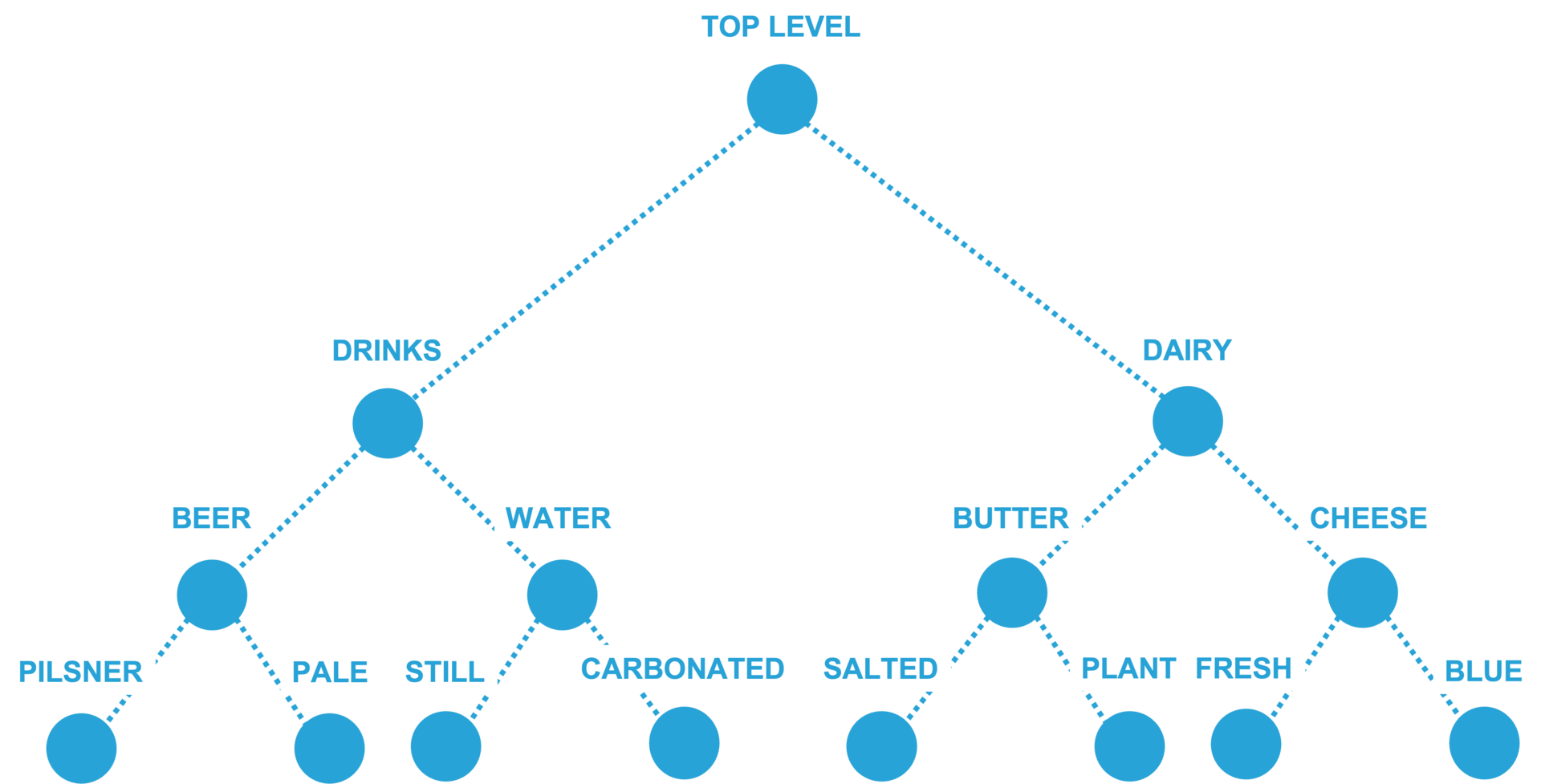
Only one category structure can be implemented — either a Tree or a Horizontal structure. If multiple category structures exist on the client’s side, the client must designate one primary structure to be used for product classification.
Columns:
category_id
string
Unique category identifier
name
string
Name of the category
parent_id
string
Identifier of the parent category. Leave empty for root categories.
categories.csv
Data Checks
All rows with an empty parent_id represent top-level categories.
Categories must form a tree-like structure, i.e. an acyclic graph.
A category tree typically consists of 3–6 levels.
The category hierarchy must be unambiguous — if multiple structures exist, a single primary structure must be chosen.
Each category must contain at least some products.
Other Options for Export
An alternative approach to the export of categories is the Horizontal structure.
horizontal_categories.csv
Products
A complete list of all products included in the analysis must be provided. This dataset should contain all essential information for each product, including the product name, description, and any other relevant metadata.
Multipacks: If each multipack's pricing is independent of its products, then each multipack should have its unique identifier. However, if the pricing of a multipack depends on the products it contains, then multipacks should not be included in the product table.
Columns:
product_id
integer/string
Unique product identifier
name
string
Name of the product
status
integer
0/6/9: 0 - active. 6 - temporarily not active (seasonal). 9 - delisted
leaf_category_id
integer
Identifier of the lowest-level category in the category structure (leaf node).
vat
decimal
Value-added tax
Optional Columns:
unit_size
decimal(2)
The product size can be expressed in kilograms, grams, or liters, but the same unit must be used consistently across the entire lowest-level category.
unit_count
integer
For multipacks, this value specifies the number of individual products contained in one pack.
products.csv
Data Checks
Each leaf_category_id must reference a leaf node — i.e. the last and most detailed level of the category tree.
Active products are defined as items that have been sold in the recent past or are newly listed.
unit_size represents the expected measurement unit within a given category. For example, do not mix grams and kilograms. In case of discrepancies, all values should be converted to kilograms.
The prices file should contain entries for the majority of active products.
Other Options for Export
Products, brands, and suppliers may be combined into a single table, but only if each product has exactly one brand and one supplier assigned.
If a product can be associated with multiple brands or suppliers, this information should be provided in separate files (see sections Brands and Suppliers).
Possible Modifications
status – a binary field (true/false) can be used.
custom_data – a column for any additional information the client would like to display on the reporting page.
product_brands_suppliers.csv
Stores
This table is mandatory and may only be omitted if a single price applies to the entire market.
Columns:
store_id
string
Unique store identifier
name
string
Name of the store
Optional Columns:
city
string
City of the store
stores.csv
Zones
A pricing zone is defined as a group of stores that share the same regular sale price. This table is mandatory and may only be omitted if there is a single pricing zone, i.e. all stores use the same price list.
Columns:
store_id
string
Unique store identifier
zone_id
string
Zone identifier
zone_name
string
Name of the zone
All stores within a single zone must share the same price (or be intended to share it in the future).
Each existing store must be assigned to exactly one zone.
zones.csv
Data Checks
store_id must not contain any whitespace characters.
Each store must be assigned to a zone.
Other Options for Export
Export zone_id and zone_name as additional columns in the stores file.
stores_zones.csv
Export zone_id as a new column in the stores file. The zones file must contain both zone_id and zone_name.
stores_zones_limited.csv
zones_limited.csv
Actual Prices
Provide the current valid regular prices for each store and product.
Notes / questions to consider when preparing data:
Do you maintain multiple “layers” of price lists? For example, can promotional and regular prices be valid at the same time? Provide only regular prices.
What is your primary data source for margin calculation? (purchase price, cost price, or stock price). Keep this choice consistent over time.
How is the cost price calculated? Do you apply retroactive adjustments (e.g. back bonuses)?
Can promotional and regular purchase prices be distinguished? If yes, compute cost price using only the regular purchase prices.
All sale prices must exclude promotional prices.
Columns:
product_id
string
Product identifier
zone_id
string
Zone identifier
price
decimal(2)
Actual regular shelf selling price, incl. VAT
cost_price
decimal(2)
Cost price, excl. VAT
prices.csv
Data Checks
The majority of active products must have an entry in the prices file.
All values in the zone_id column must exist in the zones file.
Prices must not include promotional prices.
The majority of products should have a positive margin.
Other Options for Export
Export is_promo_price as a new boolean column in the prices file. This column enables the export of actual promotional prices. It should be used in cases where the regular price is not available during promotions, and the cost price may vary significantly.
prices_with_promo_flag.csv
Sales
The sales files must contain all sales transactions. Ideally, they should cover three years of sales history, including daily increments for the most recent days.
For the first iteration, please provide two months of sales data only. This smaller dataset will be sufficient to verify the format and identify potential data issues.
Sales data types:
Historical data – Exported as monthly files in the format: sales-YYYYMM.csv (e.g., sales-201901.csv).
Incremental data (daily/weekly) – Exported as files in the format: sales-YYYYMM.csv (monthly) or sales-YYYYMMDD.csv (daily / starting day of the week).
Important considerations:
Deletion of records – Clarify whether sales records can disappear (e.g., visible one day, missing the next). Consistency of records is required.
Full-day data – The system requires complete sales data for each day. It is preferable to provide data that is two days old but complete, rather than incomplete data from the previous day.
State of orders (e-shops) – Define which orders should be treated as final sales, ensuring they are stable and unlikely to be canceled.
Vouchers, discounts, and promotions – Specify which activities affect the regular sale price and how these can be identified in the data.
Returns – Returns must not be included in the dataset.
Columns:
store_id
string
Store identifier
product_id
string
Product identifier
date
date
Date of the sale (in e-shops, ordering date)
price_type
integer
0 - Regular sales (standard price) 2 - Global promotion (leaflets, special store placement, product temporarily sold with a gift, etc.) 3 - Individual promotion (coupons, etc.) 4 - End-of-life sellout (clearance) 5 - Expiration markdown 6 - Multibuy discount 99 - Other Rare case: 1 - Regular sales individual price (VIP customer discount, Golden Card)
quantity
decimal(2)
Sales volume. May contain decimal values in the case of weighted goods.
price
decimal(2)
Sale price (incl. VAT). In the case of aggregated data, use the weighted average (weighted by quantity).
cost_price
decimal(2)
Cost price (excl. VAT) for the transaction. This can be either the cost/stock price or the purchase price from the supplier. In the case of aggregated data, use the weighted average (weighted by quantity). This value will be used to calculate profitability during the trial period and should match the definition currently applied in your BI systems.
Optional Columns:
vat
decimal(2)
VAT value of the product at the time of sale.
basket_id
string
Basket identifier
promo_type_id
string
Promotion type identifier. Valid only for price types 2 and 3 (e.g., coupon, gift, 2+1). For all other price types, leave this field empty.
Promo
shelf_price
decimal(2)
The price (incl. VAT) shown on the price tag that all customers see. This is the standard price available to everyone, without any special discounts or privileges.
Promo
timestamp
date
Sales date and time in the format HH:MM:SS.
Markdown
customer_id
string
Customer identifier
segment_id
string
Customer segment to which the customer belonged.
bulk_tier_limit
decimal(2)
Quantity tier limit that defines when the discounted price applies.
Bulk
sales.csv
Data Checks
Price and shelf_price must always include VAT (if VAT is applied).
Cost price must always exclude VAT.
No duplicate records are allowed in the file.
promo_type_id should contain only values from a predefined, limited set of options.
Zero values in the quantity, price, or cost_price columns must be checked for validity.
Transactions with significantly negative margins must be reviewed — they are typically caused by promotions or data errors.
Other Options for Export
Export aggregated by Day/Store/Product/Price Type/Promo Type. Within a single day, multiple rows may exist — one for regular sales and additional rows for each price_type_id or promo_type_id.
⚠️ This option is not recommended, as it restricts the availability of certain product features.
sales_aggregated.csv
Cross-check
Please provide aggregated transaction data once the Sales file structure has been confirmed and valid transaction history has been delivered.
This is a one-time export table used to verify data quality after the Sales history is provided. If inconsistencies are found between this manually exported data and the data exported automatically, further investigation will be required to identify and resolve the discrepancies.
The purpose of this table is to validate automatically exported data and cross-check sold quantities, revenues, and margins.
Aggregation must be performed at the top-category level.
At least 12 months of history must be provided.
Columns:
month
string
Month in YYYY-MM format (e.g., 2019-01)
category_id
string
Category identifier
store_id
string
Store identifier. If store_id is not provided, the data will be considered applicable to all stores within the defined category.
category_name
string
Name of category
store_name
string
Name of store
total_quantity
decimal(2)
Regular + Promo Quantity
total_revenue
decimal(2)
Regular + Promo Revenue, excl. VAT
total_profit
decimal(2)
Regular + Promo Profit computed as (Total Revenue excl. VAT - Total Costs, excl. VAT)
promo_quantity
decimal(2)
Promo Quantity
promo_revenue
decimal(2)
Promo Revenue, excl. VAT
promo_profit
decimal(2)
Promo Profit computed as (Promo Revenue excl. VAT - Promo Costs, excl. VAT)
cross_check.csv
Data Checks
Total quantities, revenue, and profit should correspond to expectations.
Total quantities contain either the total number of products or weighted goods that are not counted in.
Promo share should correspond to expectations.
Last updated