
Optional Dataset
These files are not mandatory, but they help improve the user experience and allow the tool to be customized for each client.
They also enable important features and functions, such as attribute-based filtering and product family creation.
Each table indicates the column name in the file, the data type, and a description. Primary keys (unique values) are highlighted in bold.
Brands
A comprehensive list of brands for each product can be provided as optional data. This information helps ensure that brand-specific constraints are handled effectively.
brand_name must be unique for each brand_id.
Variants such as ‘brand’, ‘Brand’, ‘BRAND’, or ‘brAnd’ must appear in the data as a single brand with a single brand_id.
Column
Data Type
Description
product_id
string
Unique product identifier
brand_id
string
Brand identifier
brand_name
string
Name of the brand
brands.csv
https://d3jwyy9rhyhl55.cloudfront.net/v2/4158/contents/yrubAP6vBq8MuQ5H/brands.csv
Other Options for Export
Export brand_id as a new column in the products file. The brands file should contain only two fields: brand_id and brand_name.
product_brands_limited.csv
https://d3jwyy9rhyhl55.cloudfront.net/v2/4158/contents/JbpAW33HuowMZuIK/product_brands_limited.csv
brands_only.csv
https://d3jwyy9rhyhl55.cloudfront.net/v2/56396/contents/WDRxWhkFjjj1QyJ2/brands_only.csv
Export brand_id and brand_name as new columns in the products file (see examples in the Products section).
product_brands.csv
https://d3jwyy9rhyhl55.cloudfront.net/v2/4158/contents/oyNe4wEDe3yYWHno/product_brands.csv
Suppliers
A comprehensive list of suppliers for each product can be provided as optional data. This information helps handle supplier-specific constraints more effectively.
supplier_name must be unique for each supplier_id.
Variants such as ‘supplier’, ‘Supplier’, ‘SUPPLIER’, or ‘supPllier’ must appear in the data as a single supplier with a single supplier_id.
If multiple suppliers exist, select only the primary supplier for each zone.
Column
Data Type
Description
product_id
string
Unique product identifier
zone_id
string
Unique zone identifier
supplier_id
string
Supplier identifier
supplier_name
string
Name of the Supplier
suppliers.csv
https://d3jwyy9rhyhl55.cloudfront.net/v2/4158/contents/WicqqyCr17Mi9gWL/suppliers.csv
Other Options for Export
Export supplier_id and supplier_name in the actual_prices file.
actual_prices_suppliers.csv
https://d3jwyy9rhyhl55.cloudfront.net/v2/4158/contents/waaS35xodvcYD4TG/actual_prices_suppliers.csv
Export supplier_id and supplier_recommended_sale_price in the actual_prices file. In addition, export both supplier_id and supplier_name in the suppliers file.
suppliers_only.csv
https://d3jwyy9rhyhl55.cloudfront.net/v2/4158/contents/Teu0NJvyYZgKKJwU/suppliers_only.csv
actual_prices_suppliers_limited.csv
https://d3jwyy9rhyhl55.cloudfront.net/v2/4158/contents/GhNVsytbUQ4dbNgP/actual_prices_suppliers_limited.csv
Product Classes
Assigning products to different classes helps categorize them according to how clients perceive them. This makes it possible to define specific attributes for each product and assign them to particular zones based on their class.
Typical product classes include: sensitive, normal, tail, etc.
Column
Data type
Description
product_id
string
Unique product identifier
class_id
string
Class identifier
class_name
string
Name of the class
zone_id
string
Zone identifier. Leave empty if the rule applies to all zones.
product_classes.csv
https://d3jwyy9rhyhl55.cloudfront.net/v2/4158/contents/xQufVPF2oliZn6co/product_classes.csv
Data Checks: The class_name column should contain only values from a limited, predefined set of options.
Other Options for Export
Export class_id as a new column in the products file. The product_classes file should contain only two fields: class_id and class_name.
product_classes_only.csv
https://d3jwyy9rhyhl55.cloudfront.net/v2/4158/contents/CdiuVGITKW4CGPr2/product_classes_only.csv
product_and_product_classes_limited.csv
https://d3jwyy9rhyhl55.cloudfront.net/v2/4158/contents/sPQh4hGy9AEkvTvp/product_and_product_classes_limited.csv
Export class_id and class_name as new columns in the products file.
product_and_article_classes.csv
https://d3jwyy9rhyhl55.cloudfront.net/v2/4158/contents/x6oOvoEk5lfuicKe/product_and_article_classes.csv
Families
A product family is a group of products that share identical or interdependent pricing. For example, juices of the same brand and type but with different flavors should have the same price.
If no product family records exist, Yieldigo provides a module within the tool to help create them. This module includes a suggestion mechanism that can quickly propose product groups for approval. To use this functionality, please ensure that the unit_count and unit_size fields are filled in the products file.
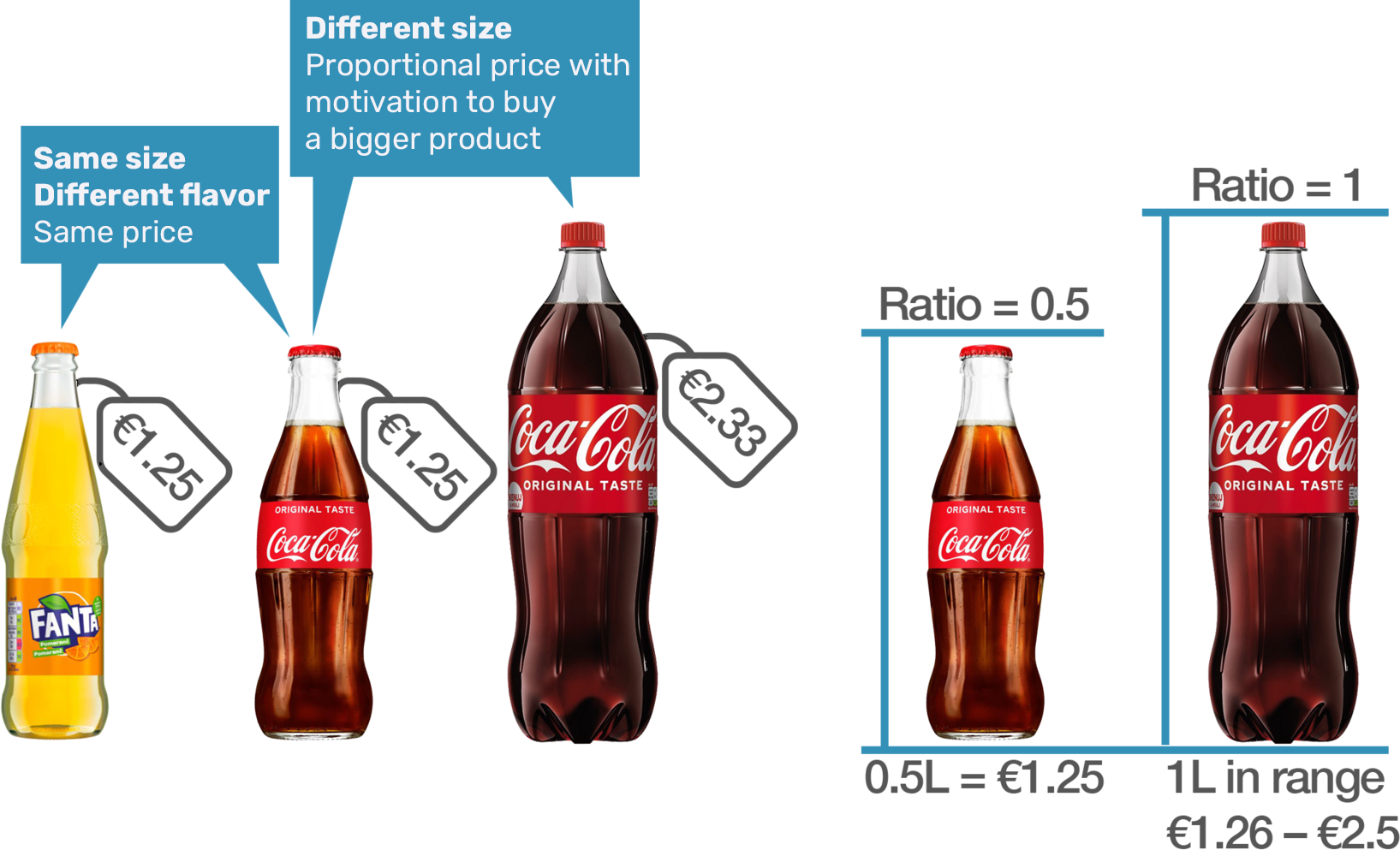
Family ratio is derived from the combination of unit_size and unit_count in the products table.
If family_ratio is not provided, all products within the same family are expected to have the same price.
Column
Data Type
Description
product_id
string
Unique product identifier
family_id
string
Family identifier
Optional Columns
Column
Data Type
Description
family_ratio
decimal(2)
The ratio of products within the same family. If the products in a family are identical, the ratio must be the same. If the products differ in size, the ratio defines their proportion.
families.csv
https://d3jwyy9rhyhl55.cloudfront.net/v2/4158/contents/Ww6NdBseGnNlXq7C/families.csv
Other Options for Export
Export family_id and family_ratio as new columns in the products file.
product_families.csv
https://d3jwyy9rhyhl55.cloudfront.net/v2/4158/contents/kZoRjaMQsNsjism9/product_families.csv
Promotions
Current and future promotional data can be provided. The system will not propose prices during a planned promotion.
However, it can display actual and upcoming promotional data to help configure exported prices that will become effective once the promotion ends. It is important to note that the regular price should always be higher than the promotional price.
To ensure this, users can set up constraints so that the exported regular price is at least x% higher than the planned or most recent promotional price.
The file should include only promotions that block repricing, not permanent promotions such as 2+1.
Column
Data type
Description
id
string
Identifier of a planned promotion
zone_id
string
Pricing zone where the promotion is valid. Use the value -1 if the promotion is always valid for all zones.
product_id
string
Product identifier
promo_type_id
string
Identifier of a promo type (possible types: coupon, gift, 2+1, etc.).
valid_from
date
Date when the promotion starts
valid_to
date
Date when the promotion ends
promo_price
decimal(2)
Promotional price, incl. VAT
discount_promotion
bool
0/1 indicator specifying whether the promotion is a discount. 0 = not discount-based (e.g., gift), 1 = discount promotion.
promotions.csv
https://d3jwyy9rhyhl55.cloudfront.net/v2/4158/contents/Dy844ro7Lj3pgbyE/promotions.csv
Data Checks: promo_type_id must correspond to the values used in the sales data. The promo_price should generally be lower than the regular price in the price list.
Competitor Prices
A summary of competitors and their prices. If available, historical data for e-shops is also highly recommended.
How often do you collect and update competitor data?
How long should the system keep these records, and for how long is a “collected” price considered valid? Are you continuously sending all valid prices?
Which competitors do you consider the most relevant?
Column
Data type
Description
product_id
string
Product identifier
zone_id
string
Use this field only if the competitor’s price is valid for specific zones. Leave it empty if the price applies to all zones.
competitor_id
string
Competitor identifier
date
date
Date when the price was collected. If this field is not provided, the import date will be used as the validity date.
competitor_price
decimal(2)
Price of the competitor, incl. VAT
competitor_price_type
bool
0/1 indicator specifying whether the price is promotional. The default value is 0.
competitor_name
string
Name of the competitor
Optional Columns
Column
Data type
Description
url
string
The URL links directly to the competitor’s price on their website.
detail
string
Any additional information
competitors.csv
https://d3jwyy9rhyhl55.cloudfront.net/v2/4158/contents/dN6rMNrbYnqFvH89/competitors.csv
Data Checks: Regular competitor prices should approximately correspond to the regular sale price.
Questions to consider about competitor data
How often do you collect and update competitor data?
How long should the system keep these records, and for how long is a “collected” price considered valid? Are you continuously sending all valid prices?
Which competitors do you consider the most relevant?
Locked Products
A list of products that should not be repriced. These products are locked and excluded from the pricing process and will not be exported. Typical examples include items restricted by law (e.g., alcohol, tobacco, medicines) or products with the price printed on the cover (e.g., magazines).
If the products are identical across all zones, the zone_id column is not required.
Column
Data Type
Description
product_id
string
Product identifier
zone_id
string
The price must be exported for the zone, as the system plans prices at the zone level.
locked_products.csv
https://d3jwyy9rhyhl55.cloudfront.net/v2/4158/contents/ARhta7l6XRRI7Ga4/locked_products.csv
Rounding Rules
Please provide the rounding rules using the rounding_rules.xlsx template.
rounding_rules.xlsx
https://d3jwyy9rhyhl55.cloudfront.net/v2/4158/contents/eWUvx5VzIwjPpYrM/rounding_rules.xlsx
Logo
You can provide your logo for display in the application; it will appear in the upper-left corner.
Logo Requirements
Format: SVG (Scalable Vector Graphics, .svg) so the app can scale the logo automatically.
Size constraint: The logo displays in a 24×24 px area. Avoid long text-only logos—they’ll be hard to read at this size.
Background: Use a transparent background.
If you only have PNG/JPEG, you can use an online converter: https://www.google.com/search?q=online+svg+converter